An assistant for all your tasks
An AI asistant to organize, detail, break down, and complete your tasks. Puts your most important tasks at the top, hides blocked tasks.
Free forever, open-source & private
Work & personal
One list
Your release review sits beside feeding the dog — one list you own, not a team tool.
Your next task, on top
Sorted for you
Importance, urgency, and deadlines order the list, so the next thing to do is already at the top.
An agent in your lists
Works in place
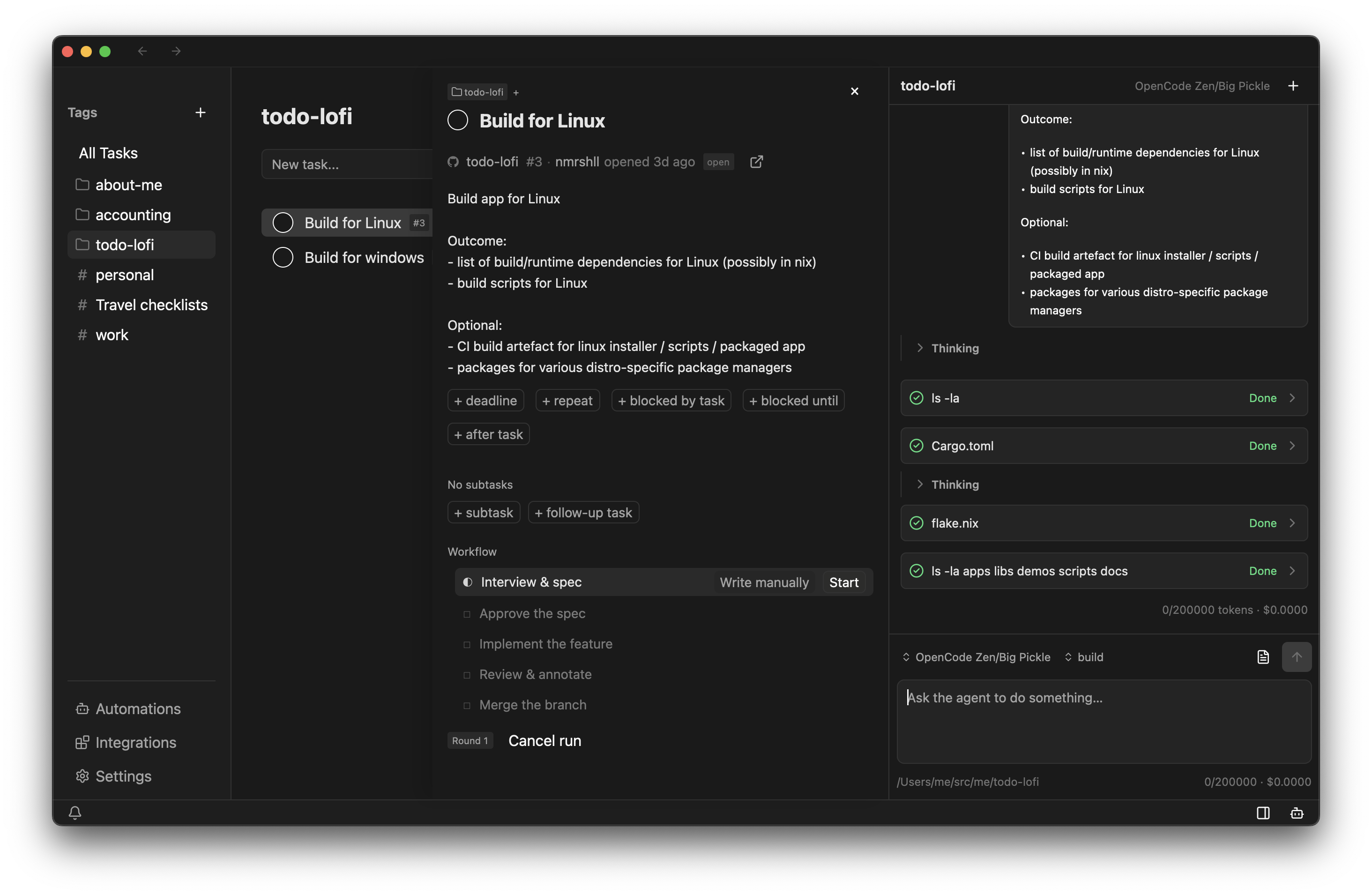
It explores a task, breaks it into sub-tasks, and drives it through its workflow — you decide when it's done.
All your tasks, organized
Everything about a task lives in one place: where it sits, what it is tagged with, and what comes next.
Blocked-by chains stay out of the list until they can start.
AI to refine a task description, split it into subtasks, then work on it by itself
The agent works in your existing lists: it adds and edits tasks, sets up repeats, and moves work through its stages.
Read about the agentSet up a repeat for watering the plants, every three days, starting tomorrow morning.
Added a repeat — every 3 days at 08:00. Tomorrow’s occurrence stays blocked until 08:00, so it will not show up in your list before it is actually doable.
Good. Take T-1303 through the coding workflow.
Started a coding run on T-1303, now in Interview. I will ask questions before anything is written, then turn the answers into a spec.
Apps that fit your workflows
Beyond the list, Taskstream ships apps that own a slice of your work. Underneath they're ordinary tasks — the value is their vocabulary and defaults, not a private store.
Mini-apps
Travel ships today: give it a trip and it fills in the packing list and pre-departure chores as ordinary tasks. Message follow-ups, birthday wishes, and job-application tracking are on the roadmap.
Read about mini-apps →Give it a trip and it writes the list as ordinary tasks.
A yearly reminder and a gift idea per person, kept as tasks.
Each stage is a section, so an application moves like any task.
Workflow recipes
A task can carry a process whose stages hold their own state: actions that become tasks, waits that hold a step until its moment, and events that wait for you. The automations pane starts a run and hands you the decision.
Read about workflows →Rejection does not throw the run away — it reopens the spec, so the next round starts from the objection.
The coding workflow
previewInterview, spec, implement, review, merge — on a real checkout, so the diffs are real. The agent works inside a stage; you decide when it is finished.
Read about the coding workflow →Your tasks, managed for you
The list is yours, but you are not the only one who can work it. The agent, the apps around it, and the mini-apps that ship with it all act on the same tasks.
Ava completed "Book the venue" — the same list, edited by someone else.
The Travel mini-app fills in the packing list and pre-departure chores.
What to do next, decided for you
A long list only helps if it orders itself. Taskstream does that quietly, so you stop re-reading everything to find what matters now.
Surfaces what you should do next
Each task carries the importance and urgency you set, and the list folds in deadline pressure: near deadlines climb, overdue tasks keep rising. Subtasks, blocked-by chains, and ordering hints resolve into what you can actually start.
Read about priority and ordering →Hides what you can't do
Set repeats in a picker — how often, which days, and when the occurrence becomes doable. A task that isn't due yet stays out of the way until it is.
Read about task dependencies and blockers →The rule decides when an occurrence becomes doable; the priority score decides where it lands once it is.
Sync with tools you already use
Can't choose your company's tools? Sync work tasks from them while keeping your personal tasks in the same list.
Todoist
availableProjects map to projects and sections to child tags, and edits travel both ways. The one to reach for if you want two-way sync today.
Read about Todoist sync →GitHub
previewIssues and projects map onto your lists through the same sync surface. Expect the mapping to shift while it settles.
Read about GitHub sync →Google Tasks
coming soonPersonal lists and their tasks, over the same two-way surface as Todoist.
Linear
coming soonIssues assigned to you, so an issue becomes a task you can actually work.
Jira
coming soonIssues and their status, for the work that never leaves Jira.
Asana
coming soonProjects and tasks, on the mapping the other syncs already use.
Crafted with care
A native, fast, battery-friendly desktop app
Instant, because it is local
Tasks live in a file on your machine, so there is no server round-trip between a keystroke and the list. It opens immediately and keeps working with no connection — no account, no telemetry, and no server in the loop. Sync and the agent are opt-in.
Native and GPU-accelerated
Written in Rust on GPUI — the GPU-accelerated UI framework behind Zed. The interface is drawn on the GPU, so scrolling and animation stay smooth even on a long list.
Shortcuts for nearly everything
Move, edit, tag, and complete without reaching for the mouse, and open the command palette to reach any action by name. The full list lives in the app.
More integrations, third-party extensions, built-in workflows to replace most single-purpose apps, p2p sync server, ... and more features on the horizon